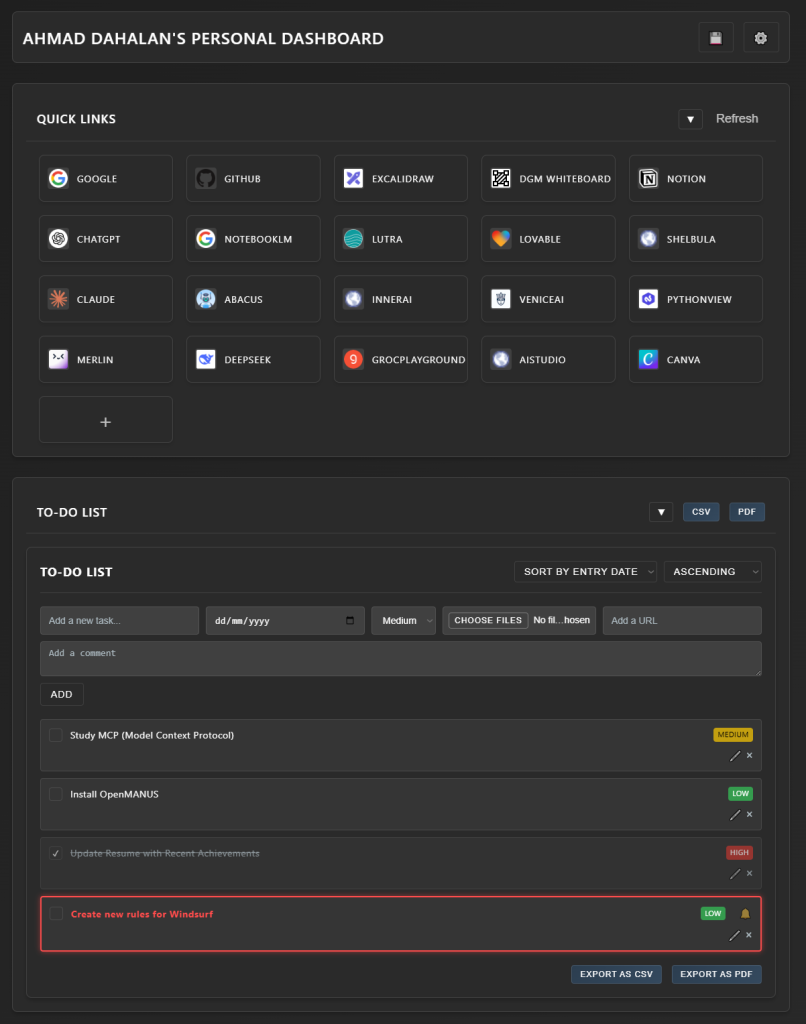
This is my latest project, the Dashboard App, a web-based application designed to help users manage their tasks efficiently. The goal of this project was not only to build an interactive task management tool but also to leverage modern web technologies to create a seamless user experience.
By utilizing a combination of JavaScript, HTML, and CSS, I aimed to develop an intuitive interface that allows users to organize, track, and prioritize their daily activities effectively.
Key Features
Task Management
Users can easily add, edit, and delete tasks, each containing essential details such as due dates, priority levels, and comments. This feature allows for comprehensive task management tailored to individual needs.
Customizable Views
The app offers various sorting options, enabling users to view tasks by entry date, due date, or priority. This flexibility ensures that users can focus on what matters most.
Export Functionality
Users can export their tasks in both PDF and CSV formats. The PDF export is neatly formatted to include only the most relevant information, while the CSV export retains all task details for further analysis.
User-Friendly Interface
The app features a clean and modern design, making it easy for users to navigate and interact with their tasks. The responsive layout ensures that the app works well on both desktop and mobile devices.
Date Formatting
To enhance readability, dates are displayed in a user-friendly format, such as “14 March 2025,” ensuring consistency across the application.
Comments and Attachments
Users can add comments and attach files to their tasks, providing additional context and resources for each item.
Priority Management
Tasks can be categorized by priority (high, medium, low), helping users focus on urgent tasks first.
Technical Implementation
Core Technologies
Frontend: HTML5, CSS3, JavaScript.
Libraries: Utilizes jsPDF for PDF generation and supports CSV export functionality.
UI Framework: Custom modern CSS design for a responsive and intuitive user experience.
Architecture and Design
Client-side execution ensures a fast and responsive interface without the need for server-side processing.
Modular JavaScript codebase allows for easy updates and maintenance.
Progressive Web App (PWA) capabilities enhance accessibility and performance across devices.
Development Workflow: Enhancing Task Management
For this project, I focused on creating a user-centric application that simplifies task management. The development process involved careful planning and execution, ensuring that every feature aligns with user needs.
Here’s what I observed:
User feedback played a crucial role in shaping the app’s features and interface.
Testing various export functionalities highlighted the importance of maintaining data integrity during downloads.
Implementing intuitive date formatting improved user satisfaction and clarity.
Conclusion
The Dashboard App is not just a task management tool; it represents a new approach to productivity, where modern web technologies and user-centric design converge to create an efficient solution for managing daily activities.
I will continue refining this application and exploring how to enhance its capabilities further, ensuring that it remains a valuable resource for users seeking to improve their productivity and organization.